Multi-Product × Multi-Agent UX Setup
A system managing 2 brands and 3 web properties, each with a dedicated UX agent. Rather than using an LLM router, deterministic scope resolution directs requests to the appropriate agent, and a requirement planner loads only the necessary skill chain for the current design state.
 Claude Code
 Figma
Figma
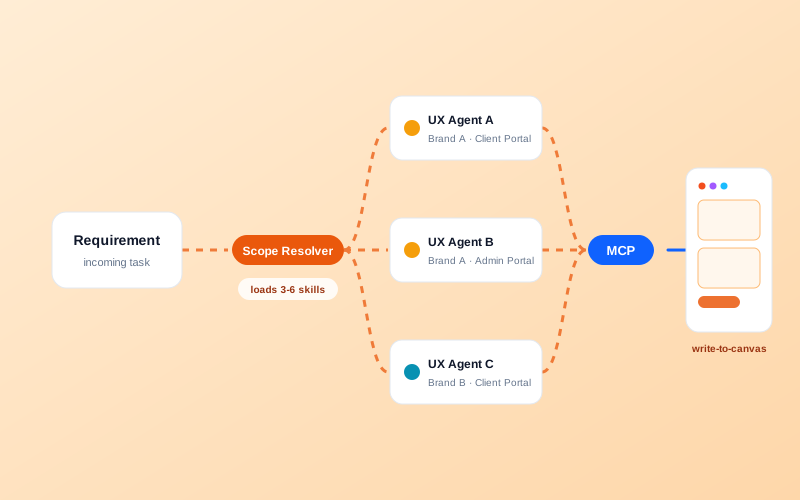
The full setup: infrastructure on the left, operations on the right, converging at one Figma MCP hub with fixed agent-to-brand assignments.
[01]
Token efficiency drives architecture
The naive approach loads all 30 Figma skills and complete design specs into every agent's context upfront. With multiple brands and properties, each maintaining separate Figma files, design system tokens, and audience constraints, this wastes tokens significantly.
The solution implements on-demand skill chain loading. A shared pool of 30 skills exists, but only 3-6 relevant skills load per task. This approach prevents cross-contamination (Brand B's spacing rules accidentally applied to Brand A) and preserves context for actual work.
[02]
Scope resolution
No separate LLM router agent mediates between incoming requests and UX agents. Instead, a lightweight deterministic resolver handles routing:
- Requests targeting specific products map to a brand (A or B)
- Brands map to web properties (Brand A: 2 properties; Brand B: 1 property)
- Each property has one dedicated UX agent defined in
.claude/agents/files - Each agent carries its Figma file URL, design system contract, and audience constraints
Brand resolution determines ownership; requirement resolution determines execution plans. Neither decision requires a dedicated LLM agent.
[03]
Shared skill pool: four chains
The 30 skills organize into four chains based on design state (a 2×2 matrix: does a design system exist? Do screens exist?):
Chain A, DS Extraction (5 skills): Screens exist but the DS does not. Extracts tokens, builds variables, generates rules.
Chain B, Screen Creation (3 skills): DS exists, screens don't. Searches the library, assembles components, verifies bindings.
Chain C, Full Build (6 skills): Nothing exists. Builds the DS first, then generates screens.
Chain D, Maintain (3 skills): Both exist. Verifies bindings, checks for drift.
Loading 3-6 skills per task costs 5-9K tokens. Loading all 30 would consume about 45K tokens, most of the context window before any actual work begins.
[04]
Design system context
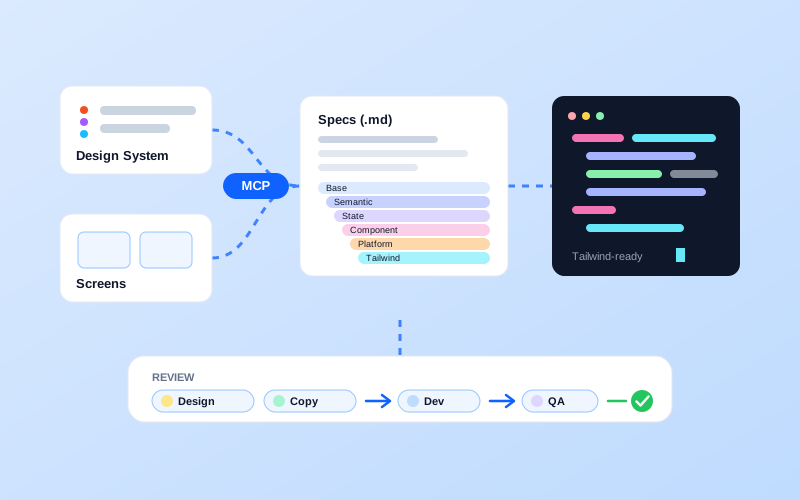
Each brand maintains a .md specification file as the agent-readable contract, synchronized from the canonical Figma source:
design-system.mdat rootfoundations/directory: color.md, typography.md, spacing.mdcomponents/directory: button.md, input.md, card.md
Agents read only their brand's specs. This prevents drift and undefined states; if Figma changes, specifications update accordingly.
Brand-scoped pipelines: each agent reads its own brand's specs and writes to its own canvas through the shared MCP hub.
[05]
LLM + Figma MCP and constraints
All agents connect through a single Figma MCP server accessed via file URLs. Write access launched March 24, 2026 (remote server only, Full seat, free beta).
Critical tools: use_figma writes frames, variables, auto-layout, and component variants. search_design_system detects reusable components.
Known constraints: use_figma returns max ~20KB per call (large screens must chunk). No image or asset import via MCP. Custom fonts unsupported. All agents share one OAuth identity (mitigated by allowlists and confirmation guards).
These constraints are encoded as guards within the shared skill pool to prevent runtime failures.
Discover More